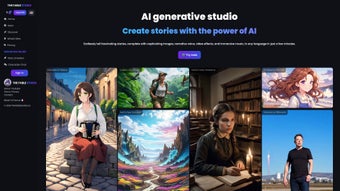

Download The Fable Studio – AI Writing Assistant, Animated Story Creator
Overview
The Fable Studio is an innovative AI‑powered writing assistant that transforms plain text into fully‑featured animated videos. Launched on August 20, 2023, the platform blends natural‑language processing, computer‑generated imagery, and voice synthesis to give writers, educators, and film enthusiasts a fast‑track route from script to screen. Unlike traditional animation software that demands technical expertise and lengthy rendering pipelines, The Fable Studio lets you type a story, choose a visual style, and watch as the AI builds scenes, characters, and cinematic effects in real time.
One of the most compelling aspects of the service is its integrated chat function. As you develop your narrative, you can engage directly with virtual characters, ask them to react, modify dialogue, or explore alternate plot branches. This interactive layer not only accelerates creative iteration but also provides a unique way to prototype dialogue‑driven experiences for games or educational modules. Because the tool is hosted in the cloud, you can access it from any modern browser—making it a truly cross‑platform solution for Windows, macOS, Linux, Android, and iOS users.
The subscription model is straightforward: a monthly fee unlocks unlimited video exports, premium visual libraries, and higher‑resolution output. For occasional creators, a free trial offers a limited number of renders, letting you test the workflow before committing. Security and privacy are baked in, with end‑to‑end encryption for uploaded scripts and AI‑generated assets, ensuring your intellectual property remains yours.
In short, The Fable Studio democratizes cinematic storytelling. Whether you’re drafting a screenplay, producing a lesson plan, or simply experimenting with visual narratives, the platform provides a seamless bridge between the written word and animated expression.
Key Features
- AI‑Generated Animation: Turn any paragraph of text into animated scenes with automatically generated backgrounds, character models, and motion.
- Real‑Time Character Chat: Interact with story characters via an embedded chat interface to refine dialogue, emotions, and actions on the fly.
- Customizable Visual Styles: Choose from a library of art directions—cartoon, realistic, watercolor, neon, and more—to match the tone of your narrative.
- Voice Synthesis & Lip Sync: Select from a catalog of natural‑sounding voices, with automatic lip‑sync that matches spoken lines to character mouth movements.
- Multi‑Track Video Editing: Add background music, sound effects, and subtitle tracks directly in the browser without external tools.
- Template Marketplace: Access pre‑built scene templates for common genres (fantasy, sci‑fi, educational) to accelerate production.
- Export Options: Download videos in 1080p or 4K, as MP4, GIF, or even as a sequence of PNG frames for further post‑production.
- Collaboration Suite: Invite teammates to comment, suggest edits, or co‑author scripts within the same project workspace.
- Secure Cloud Storage: All projects are saved securely in the cloud with AES‑256 encryption, and you retain full ownership of your content.
- Regular Updates: The development team rolls out new visual packs, voice libraries, and AI improvements monthly, ensuring the tool stays cutting‑edge.
Installation & Usage Guide
Step 1 – Create an Account
Visit the official website and click “Sign Up.” You can register with an email address or use Google/Facebook OAuth for a faster setup. After confirming your email, you’ll be directed to the dashboard where you can start a new project immediately.
Step 2 – Choose a Subscription Plan
The platform offers a free trial that includes three 5‑minute renders. For unlimited access, select the “Pro” plan at $19.99 USD per month (or annual billing at a discounted rate). Payment is processed securely via Stripe, and you can cancel anytime from the account settings.
Step 3 – Import or Write Your Script
In the project workspace, you can either type directly into the built‑in editor or paste a pre‑written script (plain text, .txt, or .docx). The AI parses scene headings, character names, and dialogue automatically, creating a storyboard layout that you can review and edit.
Step 4 – Select Visual Style & Voices
From the “Style” tab, pick a visual theme that matches your story’s mood. Then, assign voice profiles to each character. The system provides a preview of the voice line, allowing you to adjust pitch, speed, and emotional tone before final rendering.
Step 5 – Engage with the Character Chat
Open the “Chat” window to converse with any character in real time. Ask the hero to react differently, change a line of dialogue, or explore alternate outcomes. The AI updates the scene instantly, giving you immediate feedback on narrative flow.
Step 6 – Render and Export
Once satisfied, click “Render.” The cloud engine processes the animation, usually within 2‑5 minutes for a 3‑minute video. After rendering, download the video in your chosen format or share a secure link directly with collaborators.
Compatibility (itemprop="operatingSystem")
The Fable Studio is a web‑based application, meaning it works on any modern browser that supports WebGL and HTML5—Chrome, Firefox, Edge, Safari, and even mobile browsers on Android and iOS. No additional software installation is required, and the service automatically scales to your device’s resolution.
Pros and Cons
Pros
- Fast turnaround from script to animated video—ideal for tight production schedules.
- Intuitive UI that requires no prior animation or coding experience.
- Real‑time character chat fosters creative experimentation and rapid iteration.
- Cross‑platform accessibility through any web browser.
- Regular content updates keep visual assets fresh and diverse.
- Secure cloud storage protects intellectual property.
Cons
- Subscription cost may be prohibitive for occasional hobbyists.
- Highly stylized visuals can feel less custom than hand‑crafted animation.
- Complex scenes with many characters may increase rendering time.
- Limited offline functionality—requires internet connection.
- Advanced users may miss deeper control over animation rigging.
Frequently Asked Questions
Can I use The Fable Studio for commercial projects?
Yes. The Pro subscription includes a commercial‑use license, allowing you to sell, distribute, or monetize any video you create with the platform.
What file formats are supported for import?
You can paste plain text directly, or upload .txt, .docx, and .rtf files. The AI parses standard screenplay formatting (scene headings, character cues) automatically.
Is there a limit to video length?
Free accounts are limited to 5‑minute renders. Pro users enjoy virtually unlimited length, though extremely long videos may be split into multiple render jobs for performance reasons.
How secure is my data?
All project files are encrypted with AES‑256 both in transit and at rest. You retain full ownership, and The Fable Studio does not share your content with third parties without consent.
Can I collaborate with team members?
Yes. The platform includes a collaboration suite where you can invite teammates, assign roles (editor, reviewer, viewer), and leave comments directly on scenes or scripts.
Conclusion & Call to Action
The Fable Studio redefines what’s possible for storytellers who lack a traditional animation pipeline. By marrying AI‑driven visuals with an interactive chat interface, the tool empowers writers to see their words come alive in seconds rather than weeks. While the subscription cost may be a consideration, the productivity gains, rapid prototyping, and commercial‑ready output justify the investment for serious creators, educators, and indie filmmakers.
Ready to turn your next script into a cinematic masterpiece? Download The Fable Studio today and start your free trial. Experience the future of narrative creation—secure, fast, and endlessly creative.
The Fable Studio provides an intuitive AI‑driven workflow that lets writers instantly visualise stories. The real‑time chat with characters is a game‑changer, and the export quality meets professional standards.
Pros
- Lightning‑fast rendering
- Interactive character dialogue
- Cross‑platform web access
Cons
- Subscription pricing
- Limited fine‑tuned animation control



.png)



